For agencies

Client drafts you can stand behind

Write source-backed drafts on each client's WordPress site, in each client's voice, on each client's own AI key. Every draft shows the sources it was written from, so your editors check facts by following links, not by searching from scratch.

Why it fits client work

Each client pays their own AI provider

Add the client's OpenAI, Anthropic, Google or xAI key on their site, or your own. The provider bills that account directly, so there is no usage to mark up, resell or reconcile. Keys are encrypted in the database, or kept in wp-config.php.

Sources you can show the client

Drafts cite the pages they were written from, inline, with retrieval dates. The provider, model and time are saved with the post, and anything the plugin could not confirm is listed as a warning.

A voice per client

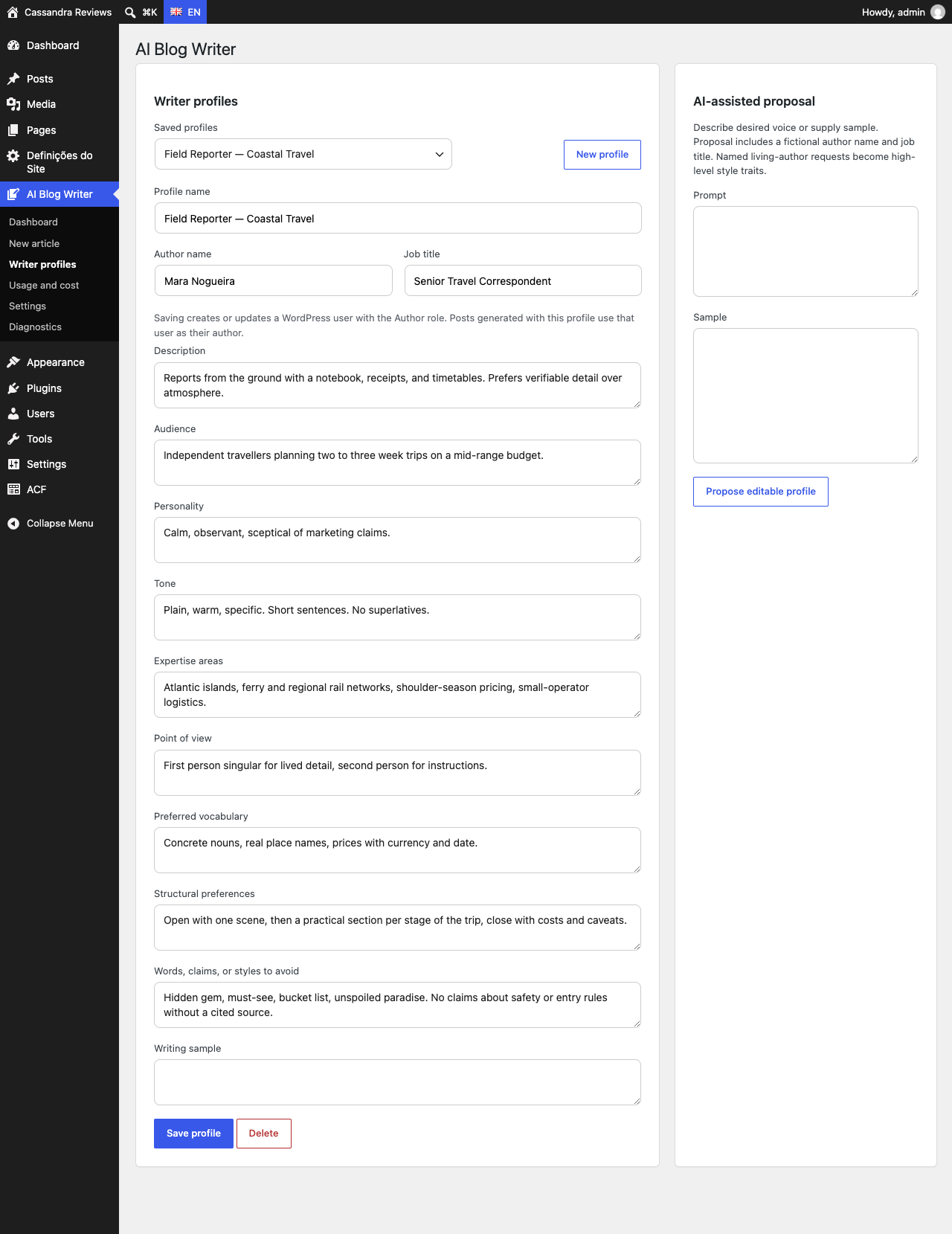
Writer profiles hold the voice, expertise, vocabulary and words to avoid, and are linked to the client's WordPress author, so drafts are credited to the right byline. Preview a profile's style before using it on a whole article.

Review before anything is written

Guided mode pauses twice: you approve the sources, then the outline. Drafts arrive as ordinary WordPress drafts in core blocks, and nothing is ever published automatically.

Spending stays predictable

Every job records its provider usage and estimated cost, from the model's list price. Set a monthly ceiling for the site and for each user, and jobs stop before going over it.

Roles that match your team

Authors write and manage their own drafts, editors see and manage every job, and only administrators change keys and settings.

One client, start to finish

  1. Install the free plugin on the client's site, add their AI key, and set a monthly cost ceiling.
  2. Create a writer profile for the client's author, from a sample of their writing if you have one.
  3. Start a Guided article with the client's own pages and the sources you trust: up to eight URLs.
  4. Approve the sources and the outline, then edit the draft in the block editor.
  5. Publish it yourself, or hand it to the client for sign-off. To write a new version later, reopen the brief behind the job.

On a multisite network, activate the plugin network-wide: each site keeps its own keys, settings, jobs and writer profiles. The plugin's screens follow each user's WordPress language (English, German, French, Spanish, Brazilian Portuguese or Japanese), and each article is written in the language set in its brief.

Writer profile editor with a linked WordPress author, voice fields, and Preview the style
A writer profile linked to the client's author, with a style preview.

AI Blog Writer Pro: the Agency plan

The free plugin works on any number of sites. AI Blog Writer Pro adds the checks that save editing time on client work, on up to 5 sites for €24 a month or €240 a year, plus VAT:

  • Find sources automatically, with a Tavily key, when the client hasn't sent any.
  • Claim-to-source check: every factual claim in the draft is marked supported, weakly supported or unsupported by the sources, so editors know where to look.
  • Citation and link check: broken links, uncited sources, and citations to pages that aren't sources.
  • Your clients' SEO plugins: apply the SEO title, description and focus keyword to Yoast SEO, All in One SEO or SEOPress, as well as Rank Math.

Two Creator licenses cost less than Agency; from three sites, Agency is cheaper. Try it free for 14 days, no card needed.

What it doesn't do

It has no white-label branding, client approval links, or writer profiles shared across a team: each profile belongs to the user who created it. It never publishes on its own, and it makes no promise about rankings or traffic. Generated drafts can still contain errors, so they need the same editorial review as any other writer's work.

Questions about using it for clients? Email info@sourcedwriter.com.